Hosting Multiple Models on NVIDIA Triton Server Across AWS, Azure, and GCP
By consolidating multiple ML models onto a single GPU instance using NVIDIA Triton Inference Server, engineering teams can achieve up to a 90% reduction in cloud infrastructure costs while maintaining sub-millisecond latencies.
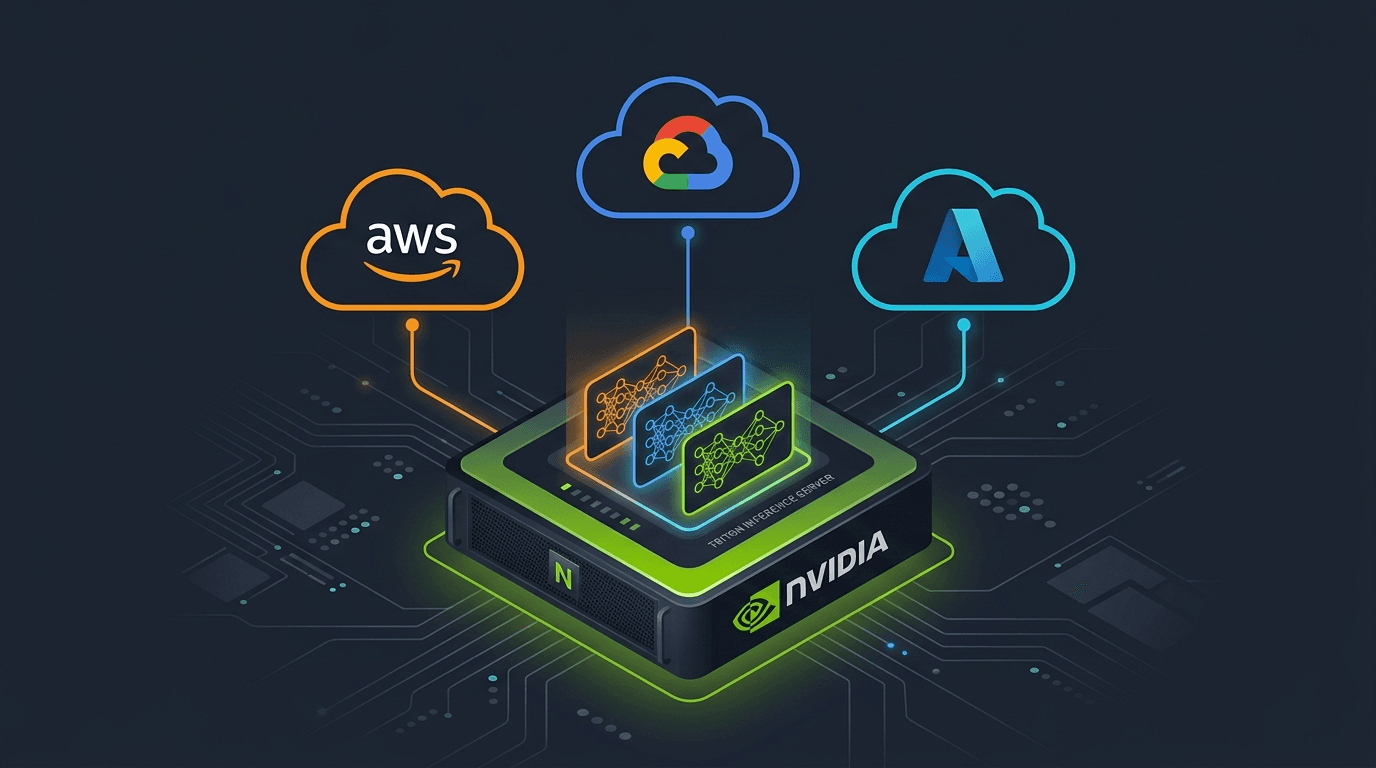
Reducing GPU Serving Costs: Hosting Multiple Models on NVIDIA Triton Server Across AWS, Azure, and GCP#
By consolidating multiple machine learning models onto a single GPU instance using NVIDIA Triton Inference Server, engineering teams can achieve up to a 90% reduction in cloud infrastructure costs while maintaining sub-millisecond latencies. This guide demonstrates how to configure, deploy, and manage a multi-model Triton environment across Amazon Web Services (AWS), Google Cloud Platform (GCP), and Microsoft Azure. The accompanying repository contains three production-ready notebooks that provide complete, end-to-end code templates to accelerate this deployment.
Why Multi-Model GPU Serving Matters#
When serving multiple deep learning models in production, allocating a dedicated GPU instance to each model often results in low utilization and high cloud expenditures. Standardizing on Triton Inference Server allows a single GPU instance to execute concurrent model inference across different frameworks like PyTorch, ONNX, and TensorRT.
However, AWS, GCP, and Azure implement multi-model Triton serving through vastly different architectural mechanisms. This analysis compares these platform configurations, highlights critical pitfalls identified during testing, and details how to execute these deployments.
Architectural Comparison of Cloud-Hosted Triton Endpoints#
The major cloud platforms differ in how they interface with Triton's native APIs and manage underlying model files. While Google Cloud and Azure run standard Triton containers, AWS wraps the server in a proprietary SageMaker management adapter.
| Platform Feature | AWS SageMaker MME | Google Cloud Vertex AI | Microsoft Azure ML |
|---|---|---|---|
| Endpoint Service | Multi-Model Endpoint (MME) | Custom Container Endpoint | Managed Online Endpoint |
| Model Allocation | Dynamic, on-demand loading from Amazon S3 | Static, loaded at startup from Google Cloud Storage | Static, mounted at startup from Azure ML model assets |
| VRAM Reclamation | Automatic Least Recently Used (LRU) model eviction | Manual configuration only (no runtime eviction) | Manual configuration only (no runtime eviction) |
| Model Updates | S3 Upload (no endpoint redeployment needed) | Full endpoint redeployment required | Full endpoint redeployment required |
| Triton Image | Pre-built wrapped sagemaker-tritonserver | Custom push of standard tritonserver to Artifact Registry | Custom push of standard tritonserver to Azure Container Registry |
| Directory Format | Flat structure; one tar.gz archive per model; folder version 1 only | Standard multi-version structure (1/, 2/, etc.) | Standard multi-version structure (1/, 2/, etc.) |
| Deploy Pre-requisites | No models required during endpoint creation | Models must be present during upload and deploy | Models must be present during upload and deploy |
| Complexity Level | Moderate (governed by SageMaker MME SDK rules) | Low (simple, direct container parameters) | High (requires custom routing and container overrides) |
Azure ML: Deployment Components#
Azure ML online endpoints are built from four resources. The built-in triton_model type relies on an outdated container image (< 24.09), so a Custom Container Deployment is required to run modern ONNX models.
Endpoint#
A stable HTTPS URL — an empty placeholder with no compute attached. Creating an endpoint is fast and free; it only reserves a DNS name and authentication keys.
from azure.ai.ml.entities import ManagedOnlineEndpoint

endpoint = ManagedOnlineEndpoint(name="triton-gpu-endpoint", auth_mode="key")
ml_client.begin_create_or_update(endpoint).result()Model#
The local model directory (standard Triton layout) registered as an Azure ML asset. At deployment time it is mounted inside the container at model_mount_path. Using type="custom_model" prevents Azure's legacy Triton parser from interfering.
from azure.ai.ml.entities import Model

model = Model(
    name="triton",
    path="./models",           # standard Triton model repository
    type="custom_model",       # bypass legacy triton_model handling
)Environment#
A custom Docker image pushed to Azure Container Registry (ACR). We need Triton 24.09+ because the default Azure image does not support ONNX opset > 9. The inference_config explicitly maps the health-check and scoring routes that Azure's frontend router expects.
from azure.ai.ml.entities import Environment

triton_env = Environment(
    image="myacr.azurecr.io/tritonserver:24.09-py3",
    inference_config={
        "scoring_route":   {"port": 8000, "path": "/"},
        "liveness_route":  {"port": 8000, "path": "/v2/health/live"},
        "readiness_route": {"port": 8000, "path": "/v2/health/ready"},
    },
)
Deployment (provisions the GPU machine)#
The most important resource — it merges the Endpoint, Model, and Environment together on a GPU VM (STANDARD_NC4AS_T4_V3). This is where compute is actually provisioned and billing starts (~10 min to create). Triton loads the model repository at startup; adding a new model requires a redeployment.
from azure.ai.ml.entities import ManagedOnlineDeployment

deployment = ManagedOnlineDeployment(
    name="blue",
    endpoint_name="triton-gpu-endpoint",
    model=model,
    environment=triton_env,
    instance_type="STANDARD_NC4AS_T4_V3",   # NVIDIA T4 GPU
    instance_count=1,
    model_mount_path="/triton",              # mount point for model artifacts
)
ml_client.online_deployments.begin_create_or_update(deployment).result()

# Route 100% traffic to the new deployment
endpoint.traffic = {"blue": 100}
ml_client.online_endpoints.begin_create_or_update(endpoint).result()
GCP Vertex AI: Deployment Components#
Vertex AI provides the simplest setup — a standard, un-wrapped Triton container with no proprietary management layer. The deployment consists of three resources.
Model#
Bundles the Triton Docker image (pushed to Artifact Registry), the GCS model repository path, and Triton CLI flags. Vertex AI does not separate the image into a distinct "environment" resource — everything is defined on the Model.
from google.cloud import aiplatform

model = aiplatform.Model.upload(
    display_name="triton-multi-model",
    artifact_uri="gs://my-bucket/triton/models",           # GCS model repository
    serving_container_image_uri=(                           # custom Triton image
        "europe-west1-docker.pkg.dev/my-project/triton-repo/tritonserver:24.09-py3"
    ),
    serving_container_ports=[8000],
    serving_container_predict_route="/v2/models",
    serving_container_health_route="/v2/health/ready",
    serving_container_args=[
        "--strict-model-config=false",
        "--vertex-ai-default-model=resnet50_onnx",
    ],
)
model.wait()Endpoint#
An empty placeholder URL, similar to Azure — no compute is attached at this point.
endpoint = aiplatform.Endpoint.create(display_name="triton-gpu-endpoint")Deploy (provisions the GPU machine)#
Binds the Model to the Endpoint on a specific machine type with GPU. This is where actual compute is provisioned — equivalent to Azure's ManagedOnlineDeployment. Triton loads the full model repository from GCS at startup; adding a new model requires a redeployment.
endpoint.deploy(
    model=model,
    machine_type="n1-standard-4",
    accelerator_type="NVIDIA_TESLA_T4",
    accelerator_count=1,
    min_replica_count=1,
    max_replica_count=1,
    traffic_percentage=100,
)
Vertex AI Caveats#
- 1.5 MB payload limit — client-side preprocessing must flatten input arrays and round floats to 3 decimal places to stay under the threshold.
- Model routing — use the
X-Vertex-Ai-Triton-Redirectheader to target a specific model inside the container (e.g.v2/models/resnet50_onnx/infer). This value is only used during deployment initialization to satisfy the endpoint setup requirements and is not used for subsequent inference requests, which can target any model available in the Triton model repository.
AWS SageMaker MME: Deployment Components#
SageMaker Multi-Model Endpoints work fundamentally differently from Azure and GCP. Models are loaded dynamically on demand — they do not need to be present at startup. Each model is packaged as a separate .tar.gz archive in S3.
SageMaker Multi-Model Request Pipeline#
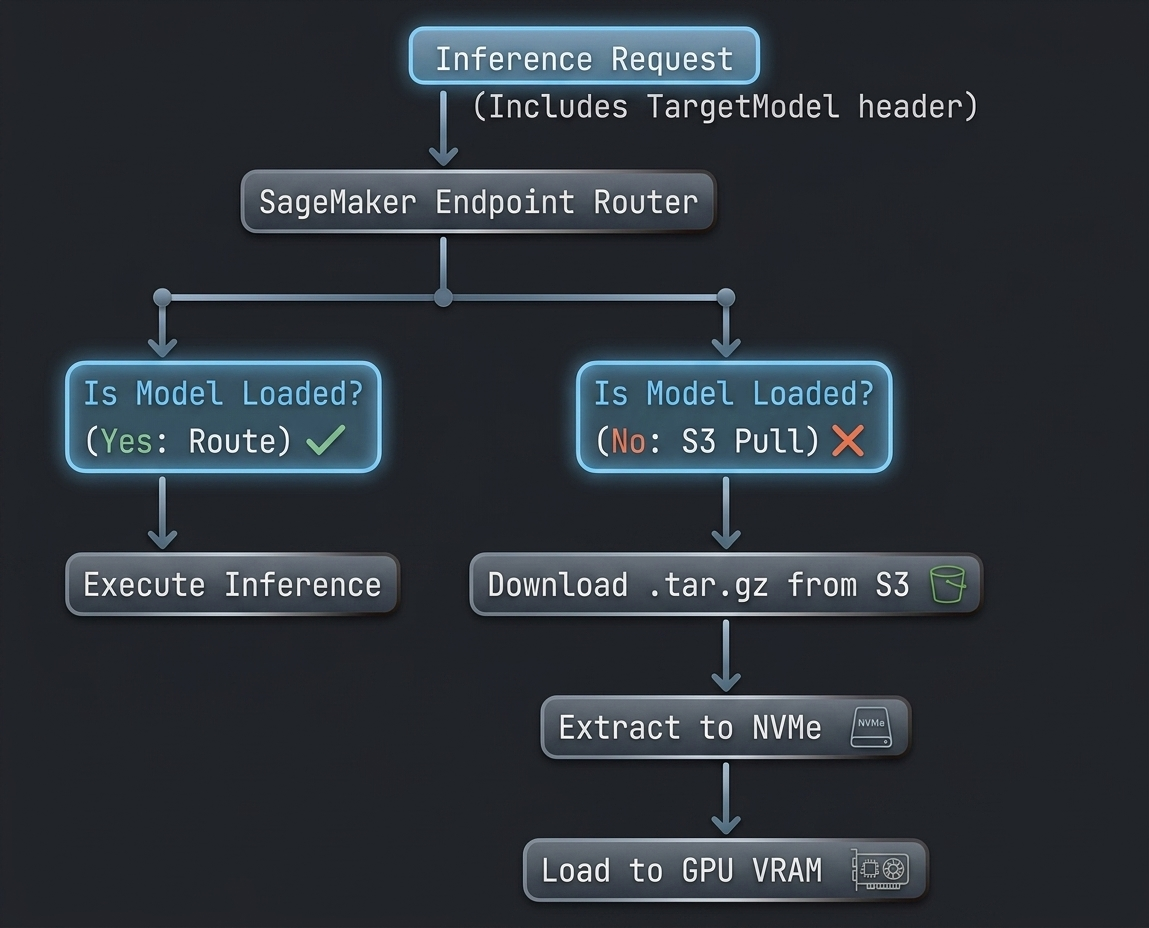
If GPU memory is full, an automatic LRU policy unloads inactive models. This enables thousands of models on a single GPU, at the cost of cold-start latency on first invocation. SageMaker wraps Triton with sagemaker-tritonserver, which prevents direct access to native Triton APIs and restricts archives to a single version folder 1.
Model#
Points to an S3 prefix (not a single artifact) and the Triton Docker image URI. Mode: MultiModel tells SageMaker to treat the prefix as a collection of independently loadable model tarballs.
container = {
    "Image": f"{TRITON_ACCOUNT_ID}.dkr.ecr.{region}.amazonaws.com"
              f"/sagemaker-tritonserver:24.09-py3",
    "ModelDataUrl": f"s3://{bucket}/{s3_prefix}/",   # S3 prefix with .tar.gz archives
    "Mode": "MultiModel",
}
sm_client.create_model(
    ModelName=model_name,
    ExecutionRoleArn=role_arn,
    PrimaryContainer=container,
)
Endpoint Config#
Machine specification only — no compute is provisioned yet. Defines the instance type (GPU), initial instance count, and traffic weight.
sm_client.create_endpoint_config(
    EndpointConfigName=endpoint_config_name,
    ProductionVariants=[
        {
            "VariantName": "AllTraffic",
            "ModelName": model_name,
            "InitialInstanceCount": 1,
            "InstanceType": "ml.g4dn.xlarge",        # NVIDIA T4 GPU
            "InitialVariantWeight": 1.0,
        }
    ],
)
Endpoint (provisions the GPU machine)#
The most important resource — it actually spawns the GPU instance and starts the Triton container. This is the main billable component. Unlike Azure and GCP, adding a new model only requires uploading a new .tar.gz to S3 — no redeployment needed.
sm_client.create_endpoint(
    EndpointName=endpoint_name,
    EndpointConfigName=endpoint_config_name,
)
Operational Experience: Succeeded Configurations and Pain Points#
Testing these configurations across different workloads highlighted key operational trade-offs for each platform.
AWS SageMaker MME#
- What Succeeded: Excellent cost efficiency for long-tail models. Storing models in S3 avoids endpoint redeployment costs when adding new models.
- What Failed: The lack of direct access to Triton APIs prevents manual model loading, making it difficult to control VRAM allocations. Cold starts introduce significant latency spikes during initial model invocations.
GCP Vertex AI#
- What Succeeded: The simplest and most standard deployment experience. Compatible with native Triton directory configurations, allowing for multi-version setups.
- What Failed: The strict 1.5 MB payload limit requires aggressive client-side preprocessing. High-frequency model updates are slow due to the requirement of a full endpoint redeployment.
Azure ML Managed Endpoints#
- What Succeeded: Provides robust enterprise scaling and deployment isolation once configured.
- What Failed: Extremely high initial configuration complexity. Bypassing Azure's outdated default
triton_modelimage is necessary to run modern ONNX models.
Architectural Recommendations and Conclusion#
The choice of cloud provider for hosting a multi-model Triton deployment depends on model lifecycle patterns, latency tolerances, and existing cloud infrastructure.
-
Select AWS SageMaker MME if the system hosts a large catalog of infrequently called models, where a small cold-start latency is acceptable in exchange for automated VRAM management and lower storage costs.
-
Select GCP Vertex AI Custom Containers if standard Triton features (like model versioning, ensembles, or BLS) are required, and the total model catalog size fits statically within the target GPU memory.
-
Select Azure ML Custom Containers only when enterprise requirements mandate Azure infrastructure, and the team can invest the effort required to configure and maintain custom container environments.
Code, Models, and Support#
All code, models, and weights used in this post are available in the accompanying repository, including the three end-to-end notebooks:
aws-sagemaker-mme-with-triton.ipynbgcp-vertex-ai-endpoint-with-triton.ipynbazure-ml-endpoint-with-triton.ipynb
If you run into questions or issues while following along, please open an issue on GitHub.